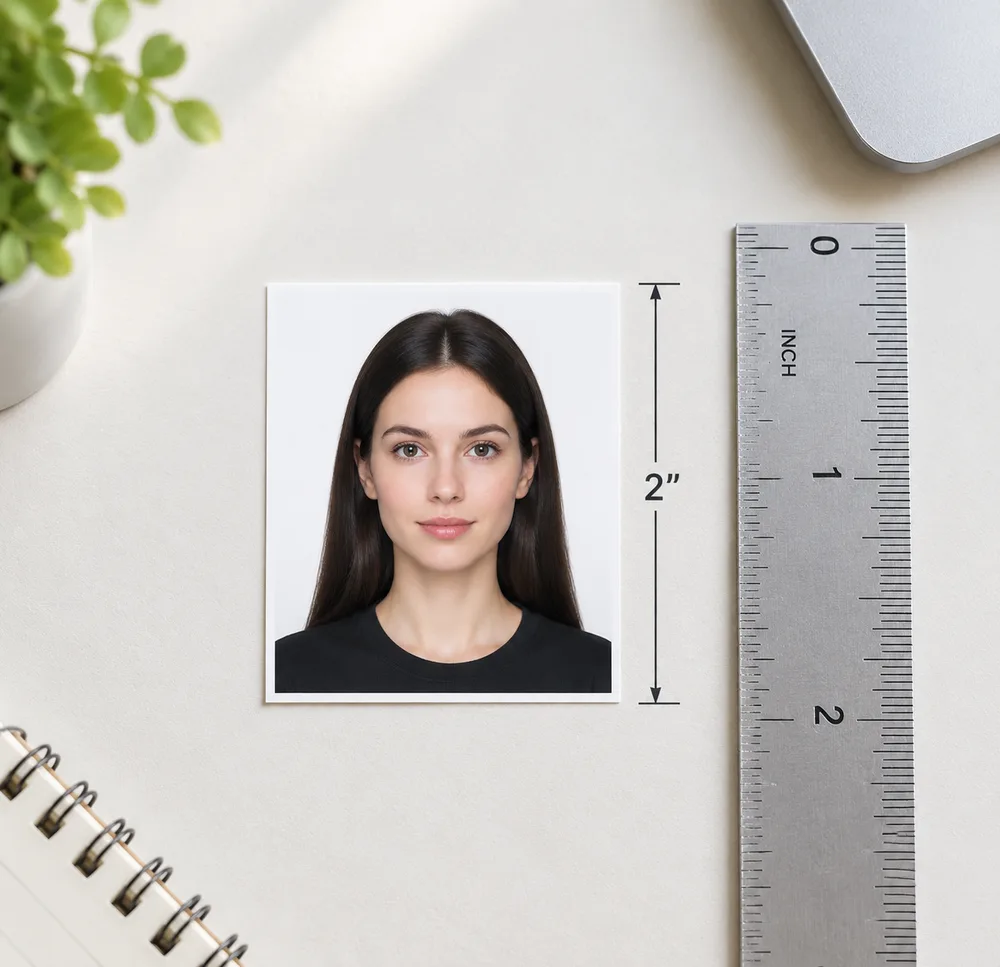
US passport and most US visa applications require a 2×2 inch (51×51 mm) square photo. Getting the size wrong is one of the most common rejection reasons — and it happens even with photos that look fine to the eye. This guide covers the official dimensions, head-size requirements, digital specs, and the fastest way to get a correctly sized print-ready file at home.
Official reference: U.S. Department of State — Passport Photos (printed size 2×2 in / 51×51 mm; head height 1–1⅜ in / 25–35 mm). Overview of biometric standards: Passport photograph (Wikipedia).
Need the photo now? Make a US 2×2 passport photo online from a selfie — free preview, then unlock the digital file and a 4×6 print sheet.
Quick Specs
| Rule | Requirement |
|---|---|
| Photo size | 2×2 in (51×51 mm) — square |
| Color | Full color (not black & white) |
| Background | Plain white or off-white |
| Head height | Chin to top of head: 1–1⅜ in (25–35 mm) |
| Expression | Neutral, both eyes open, mouth closed |
| Glasses | Not allowed |
| Recency | Taken within the last 6 months |
| Digital dimensions | 600–1200 px (square JPEG) |
| Digital file size | 54 KB – 10 MB |
Always confirm the exact rules on your specific form — DS-11 (new passport), DS-82 (renewal by mail), online renewal portal, or your visa category. The core 2×2 size is consistent, but some forms have additional requirements.
What Documents Use the 2×2 Size?
The 2×2 inch (51×51 mm) standard applies to:
- US passport (new applications and renewals)
- US non-immigrant visas (B-1/B-2, F-1, J-1, H-1B, and most others)
- US immigrant visas (green card / immigrant visa applications)
- US visa renewals at most embassies and consulates
- Naturalization applications (Form N-400)
- Travel documents (refugee travel documents, re-entry permits)
Some specialized US visa categories or consular posts may list different requirements — always follow the specific form you are filling out.
Head Size: The Most Misunderstood Rule
The 2×2 inch outer dimension is just the crop size. The head size within the crop is a separate requirement that trips up many applicants:
| Measurement | Requirement |
|---|---|
| Head height (chin to top of head) | 1 inch to 1⅜ inches (25–35 mm) |
| Head position | Centered horizontally and vertically |
| Face as portion of frame | Approximately 70–80% of image height |

Why head size matters
A photo where the person appears tiny in a large frame (head less than 1 inch) will be rejected as much as one where the head is too large (forehead cut off). The automated processing systems measure facial landmarks to verify the head height ratio.
Common head-size mistakes
- Too small: Taking a full-body selfie and cropping — the face ends up far too small
- Too large: Standing too close to the camera — the top of the head is cut off
- Off-center: Head tilted or shifted to one side
- Chin cut off: Camera angle too high, creating a downward-looking photo
Digital Photo Dimensions (for Online Renewal)
If you are uploading a digital photo for the US online passport renewal system, the requirements are pixel-based rather than physical-size-based:
| Spec | Requirement |
|---|---|
| Format | JPEG / JPG preferred (also PNG, HEIC, HEIF) |
| Width × Height | 600×600 px minimum — 1200×1200 px maximum |
| Shape | Square (1:1 aspect ratio) |
| File size | 54 KB minimum — 10 MB maximum |
| Color space | sRGB |
| Source | Original digital photo (not a scan of a print) |
A 2×2 inch photo at 300 DPI equals exactly 600×600 px — the minimum. Most phone cameras shoot at much higher resolution, so exceeding the minimum is easy. The common problem is the square crop — phone photos are rectangular (4:3 or 16:9) and must be cropped to square before upload.
For a full breakdown of digital upload requirements: Digital passport photo requirements for online renewal.
How Many Photos Do You Need?
| Application | Photos required |
|---|---|
| New passport (DS-11) | 1 photo |
| Renewal by mail (DS-82) | 1 photo |
| Online renewal | 1 digital upload |
| Child's passport (under 16, DS-11) | 1 photo per child |
| Visa application | Usually 1–2 photos (check specific form) |
| Naturalization (N-400) | 2 photos |
For mail-in applications, print at least 2 copies even if only 1 is required — errors happen, and having a backup saves time.
US Passport Size vs. Other Countries
The 2×2 US standard is different from most of the rest of the world:
| Country / Region | Photo size |
|---|---|
| United States | 2×2 in (51×51 mm) |
| United Kingdom | 35×45 mm |
| European Union / Schengen | 35×45 mm |
| Canada | 50×70 mm |
| Australia | 35×45 mm |
| China (passport) | 33×48 mm |
| Japan | 45×45 mm |
If you are a US citizen traveling to a country that requires a visa, the local embassy may use a different photo size. Always check the specific visa application instructions. See the full passport & ID photo sizes chart.
US Passport vs. US Visa Photo Size
One common misconception: many people believe US immigrant visa photos use a different size (sometimes cited as 35×40 mm from older guidance). This is outdated.
Current rule: US non-immigrant and immigrant visa photos both use 2×2 inches (51×51 mm) — the same as the passport. Some embassies may have local variations, but the State Department standard is 2×2 for all US passport and visa photos submitted in the US.
Printing 2×2 Photos on 4×6 Paper
Most US photo kiosks (CVS, Walgreens, Walmart, Costco) print on 4×6 inch / 4R paper. A 4×6 sheet fits:
- 4 photos with standard gaps (common at drugstore counters)
- 4–6 photos using a layout tool with adjustable gaps

Steps to print 2×2 on 4×6
- Get a compliant 2×2 JPEG — from the homepage maker or an existing file
- Open the Photo Sheet Maker, choose US Passport / 2×2, paper 4×6
- Download the 300 DPI JPEG sheet
- Print at 100% / actual size — no "fit to page," no scaling
- Cut along the guides
For drugstore-specific guides: print at CVS · Walgreens · Walmart.
How to Take the Selfie at Home
You don't need a studio. Follow these steps:
- Find a plain white or off-white wall. Stand 0.5–1 m away from it to minimize background shadows.
- Use even front lighting. Two lamps at eye level on either side, or a window directly in front of you. Avoid overhead-only or backlit setups.
- Remove glasses, hats, and headphones. No headwear unless for daily religious practice.
- Have someone else take the photo with the rear camera — front cameras are lower resolution. Camera at your eye level, not above or below.
- Turn off Portrait Mode and any beauty, smooth, or enhance filters.
- Face the camera directly, eyes open, neutral expression or relaxed closed-mouth smile.
Then upload to Just ID Photo — we crop to true 2×2 and process the background. Preview is watermarked and free; unlock after you're satisfied.
Frequently Asked Questions
Is the US passport photo size the same as a visa photo?
For most US visas, yes — both use 2×2 inches (51×51 mm). Older guidance sometimes cited 35×40 mm for immigrant visas, but current State Department requirements use 2×2 for both. Always follow the instructions on your specific form.
Can I use a phone photo?
Yes. Use the rear camera, turn off Portrait Mode, disable beauty filters, and have someone else take the photo. Make sure the face is sharp, well-lit, and the background is plain white. The main rejection risks are Portrait Mode blur, skin smoothing, and busy backgrounds.
How much do drugstore passport photos cost?
In-store counters at CVS, Walgreens, and similar stores typically charge $15–17 per sitting (2 prints). Online services like Just ID Photo charge significantly less and give you both a digital file and a print-ready 4×6 sheet.
What if I already have a compliant 2×2 JPEG?
Use the free Photo Sheet Maker to create a 4×6 print layout — no payment needed if you already have the cropped photo.
Can I cut the 4×6 sheet myself?
Yes. Cut along the guide lines with scissors or a paper cutter. Use photo scissors (without serrated edges) for clean cuts.
How do I know if my photo is the right size when printed?
If you print the 4×6 sheet at 100% / actual size (not "fit to page"), the individual photos will be exactly 2×2 inches when cut. You can verify with a ruler. The most common mistake is allowing the printer to scale the image to fit the paper.
How long is the photo valid?
The photo must have been taken within the last 6 months. There is no separate photo expiration beyond this recency requirement.
Is 2×2 inches the same as 5×5 cm?
No. 2×2 inches = 5.08×5.08 cm = 51×51 mm. The closest metric standard is 50×50 mm (very close but not exact). For US government forms, use the inch specification: 2×2 inches / 51×51 mm.
Can I submit the same photo for passport and visa?
Yes, if the photo is recent (within 6 months) and meets all requirements. Many applicants use the same 2×2 photo for both. Check your specific visa application for any additional requirements.
Related Guides
- US passport photo requirements (complete checklist)
- Passport photo white background requirements
- Digital passport photo requirements (online renewal)
- Passport photo requirements for babies & infants
- Passport & ID photo sizes chart (mm)
- UK passport photo size (35×45)
- How to print passport photos at home on 4×6
- Print at CVS · Walgreens · Walmart
- Make ID Photo · Photo Sheet Maker

